Python Control Flow Loops: Automating Repetitive Tasks
Loops allow you to run a block of code repeatedly. Whether it's processing thousands of database rows or iterating through a simple list, loops are the backbone of automation in Python.
1. Types of Python Control Flow Loops
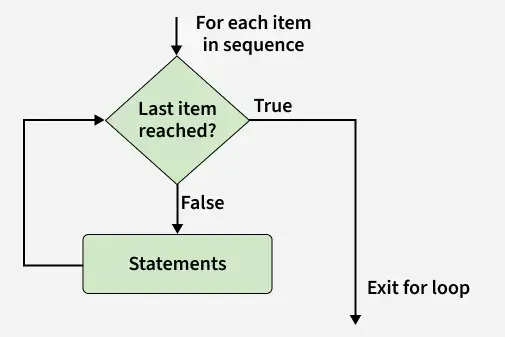
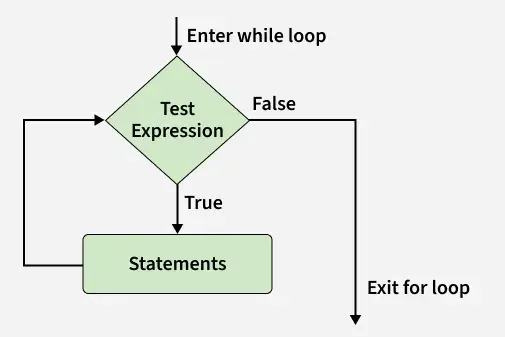
Python offers two main ways to repeat logic:
| Loop Type | Best Used For | Technical Example |
|---|---|---|
| for | Known iterations | Traversing a list or string. |
| while | Unknown iterations | Running until a condition changes. |
2. Logic of Loop Control Statements
Sometimes you need to exit a loop early or skip a step. We use "Jump" statements for this:
- break: Immediately ends the loop.
- continue: Skips the current step and moves to the next iteration.
- pass: A placeholder that does nothing (prevents syntax errors).
3. Execution and Efficiency
⚠️ Performance Warnings
Infinite Loops: Occur when a while condition never becomes False. Your program will freeze!
Nesting: Placing a loop inside another loop can slow down your code exponentially on large datasets.
4. Pro-Tip: The else Clause in Loops
In Python, loops can have an else block. It runs only if the loop completes naturally (i.e., it did NOT hit a break).
Practice MCQs
1. Which loop is best for iterating over a fixed list?
A) while | B) if | C) for | D) break
2. What happens when 'continue' is triggered?
A) Loop terminates | B) Current step is skipped | C) Program crashes
3. Which is a "null" placeholder inside a loop?
A) stop | B) skip | C) pass | D) exit